
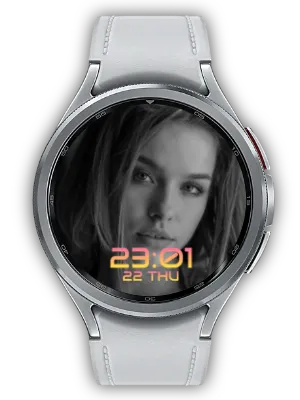

What It Does
Display chart images from Crypto Watch behind a digital clock on Wear OS.
This Watch Face Format (WFF) watch face supports Always-on Display (AOD).
Customize Your View
Choose clock size, position and color presets in the watch face customization screen. Select a contrasting color and a clear area of the photo to make the time easier to read. Medium or Large time size. A dark gradient follows the Top or Bottom clock position to improve contrast over the chart.

A Style for Your Everyday Glances
Keep a chart image behind a clearly readable digital clock. Top or bottom placement automatically adds a dark gradient behind the time; the background also shifts slightly in the opposite direction to reduce overlap. Choose Medium or Large to balance the chart and clock.
Connect Charts from Crypto Watch
Install Crypto Watch and select its photo complication in the background image slot. Configure the coins and chart content in the companion app; the resulting image is displayed behind this face’s clock.
Chart content and refresh timing are determined by the provider. This face displays the supplied image rather than fetching prices itself. The same image slot can also use another compatible Photo provider when you prefer a personal photo.
Make the Time Easy to Read
Open Customize by long-pressing the watch face and adjust the available size, position and color settings. Keep the clock away from a portrait’s face or the most detailed part of a picture, and choose a color with enough contrast.
Check the result with the actual background you plan to use. A simpler image or a different supported layout can give the clock and information more room without changing the image provider.
Always-on Display and Setup Tips
The face uses Watch Face Format and supports Always-on Display (AOD). With AOD enabled on the watch, the system switches to the ambient presentation; its appearance can be simpler or dimmer than the active screen.
If the face is missing from the selection list, confirm that it is installed on the watch and that the watch supports WFF. If photos or text are missing, reopen Customize and select the correct compatible provider. Companion settings supply content; this face’s settings determine its presentation.
How to Get Started
- Install the watch face on a compatible Wear OS watch and select it in the watch face list.
- Long-press the watch face and open Customize.
- Select the relevant complication slot and choose a compatible provider.
- Adjust the clock style and confirm your changes.
Related Apps
Install Crypto Watch to supply chart images, then select its photo complication in the background slot. The watch face does not fetch prices itself; chart content and refresh timing come from the provider. You can also select another compatible Photo provider.
Updates
- Compatibility update: Updated to meet Android 15 (API 35) target requirements.
- Chart background and layout: Added a WFF watch face for chart images from Crypto Watch. The clock uses Top or Bottom positions, Medium or Large size and color themes. A gradient behind the time improves contrast; the background shifts slightly away from the clock.
- Current Build: Crypto Watch Face is available with crypto chart background via the Crypto Watch Photo complication, an automatic readability gradient behind the time, top/bottom time placement, medium/large time size, color themes, and Always-on Display.
- Initial Release: Initial release of the crypto chart background watch face for Wear OS, with top/bottom time placement and a readability gradient behind the time.
We welcome your feedback and suggestions.


