
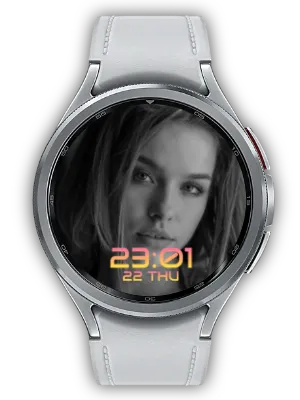

My Photo Watch Frame turns your Wear OS watch into a personal photo frame. Choose photos from your phone, send them to your watch, and use them as a full-screen frame, a Wear OS Tile, or a photo complication on compatible watch faces.
The app is built for everyday glances: family photos, pets, travel memories, landscapes, quotes, or any image you want to keep close without opening your phone.
Key Benefits
- Live Photo Share: connect with a friend or family member and see the photos they share appear on your watch in real time.
- Unlimited photos: add multiple photos from your gallery or share images from other apps.
- Wear OS Tile: swipe to view photos without changing your current watch face.
- Photo complication: show a small photo album on compatible watch faces.
- Phone widget: display the same photo frame on your phone home screen.
- Smart cropping: face-aware cropping helps keep people centered on small screens.
- Photo editing: rotate, brighten and filter your images before enjoying them on your watch.
- D-Day with a preview: choose Compact or Focus for the watch frame, Tile, phone widget and slideshow.
- Phone slideshow: turn your phone into a fullscreen photo frame, with optional playback when charging begins.
Live Photo Share — Their Moments, on Your Wrist
The photos you love most are the ones from the people you love. With Live Photo Share, connect with a partner, a friend, or a family member and share photos directly to each other's watch. When they add a new photo, it appears in your photo frame in real time—no messaging app, no manual saving, no extra steps. Even when you are apart, their moments stay close on your wrist all day.

It works both ways. Photos you share flow to their watch, and the photos they share flow to yours—so a single glance keeps you connected across any distance.
- Real-time delivery: shared photos show up automatically on the watch face, Tile, and phone widget.
- Two-way sharing: both of you see each other's latest photos, side by side with your own.
- Effortless connection: pair once, then simply add photos—the sharing happens on its own.
- Stay in control: disconnect anytime, and shared photos are cleared automatically when you do.
❤️ "Share photos. See them live."
Use It With Our WFF Watch Faces
My Photo Watch Frame manages and syncs your photos. To place those photos directly on a watch face through Photo Complication, install a compatible Watch Face Format (WFF) watch face separately, then choose the My Photo Watch Frame photo complication in the watch face settings.
- My Photo Watch Face: Clean: a clean photo-first WFF watch face for everyday use.
- My Photo Watch Face: Thin: a minimal WFF style with slim typography and flexible time positioning.
- My Photo Watch Face: Cute: a warm WFF style with rounded typography for family, pet, and casual photos.
- My Photo Circle Watch Face: a circular WFF layout that keeps your photo visible with smart composition.
- My Photo Quote: Daily Inspire: a WFF watch face that combines your photos with quotes and affirmations.
Simple Photo Management
Select photos from your mobile gallery, share images from another app, and sync them to your watch. The app prepares watch-sized images and helps keep faces centered.

Photo Frame on Your Watch
Use your selected photos as a personal frame on the watch. Move through photos with a touch or enable shuffle mode so each glance feels fresh.

Wear OS Tile
If you want to keep your current watch face, add the photo Tile instead. A single swipe brings your photo frame into view.

Flexible Display Settings
Style the app’s photo frame from your phone with time format, fonts, colors, gradient overlays, time position and size, optional date display and shuffle. Montserrat and Share Tech Mono offer additional looks. For a separately installed WFF watch face, change the clock layout in that face’s Customize screen. Turn AOD on or off in the watch’s system settings.

Phone Home-Screen Widget
Add a 2×2 or 4×4 photo widget to your phone home screen to enjoy the same photo collection without opening the app. Use the smaller widget for a compact reminder or the larger one to give a family portrait more space. Photos can rotate automatically; refresh timing may vary with the phone’s battery settings.

Manage Several Photos in One Gesture
Add a collection from your gallery or share images from another app. Face-aware cropping centers detected faces, including groups, while photos without a detected face use a central crop. Images are prepared for the watch’s small display.
Long-press to enter selection mode, then drag to select several photos. The selection controls at the bottom keep album cleanup close at hand when you want to replace older pictures or organize a new set.
Give Each Photo the Look You Want
Tap a photo to open the editor and adjust rotation, brightness and filters. Straighten a shot taken sideways, lift a dark image or add a different mood before viewing it in your watch frame.
Prepare a travel collection or family portraits on the phone’s larger screen, then enjoy the edited photos as part of your synced album.
D-Day: Keep an Important Date beside Your Photos
Combine a meaningful photo with an anniversary, a trip or another date you want to remember. Choose Compact for a restrained display or Focus to make D-Day stand out, and check the settings preview before applying the style.
The D-Day style carries across the watch app’s frame, Wear OS Tile, phone widget and fullscreen slideshow. A separately installed WFF watch face controls its own layout through Customize.
Turn Your Phone into a Fullscreen Photo Frame
Start a fullscreen slideshow with the play button on the main screen. Enable time display to show a clock over the photos, making your phone a photo frame for a desk or bedside table.
For charging-time playback, enable the option and keep the app open. The slideshow starts when charging begins while the app is open. Launch the watch’s frame directly on the watch.
Choose between a Frame, Tile and Watch Face
Open the watch app for a fullscreen frame, add the Tile for quick access by swiping, or place the photo complication in a compatible watch face’s image slot. Each option uses the photos you manage on the phone.
The Watchface tab lets you browse previews and install compatible WFF faces separately. A built-in list is available when the catalog cannot load. Install both the phone and watch apps for syncing, then choose a separate watch face if you want photos alongside its clock.
Best For
- Family and pets: keep meaningful photos visible throughout the day.
- Travel memories: turn favorite places into a glanceable frame.
- Quotes and reminders: pair images with simple text-based motivation.
- Any watch face: use the Tile or complication without changing your whole setup.
How to Get Started
- Select photos from your mobile gallery or share images into the app.
- Sync the photos to your Wear OS watch.
- Install a compatible WFF watch face separately if you want to use photos as a watch face background.
- Choose the frame, Tile, Photo Complication, or phone widget view.
- Adjust time, style, shuffle, and layout settings from the phone.
My Photo Watch Frame gives you several ways to keep personal photos close: on the watch face, in a Tile, as a complication, or on your phone home screen.
Updates
- Release highlights: D-Day gains Compact and Focus styles with a settings preview across the watch app, Tile, phone widget, and slideshow. Onboarding links to the detailed website guide. Ad requests now wait for consent, purchase status, and SDK readiness, with duplicate interstitial requests prevented.
- Release highlights: Tap a photo to edit rotation, brightness, and filters before displaying it on your watch.
- Live Photo Share Cleanup Fix: When you disconnect from a friend, the photos you shared are now cleared too. Fixed an issue where a previous friend's photos could remain visible after you connected with someone new.
- Watch Font and Photo Fixes: Montserrat and Share Tech Mono now apply correctly on the watch, and photo rotation no longer gets stuck in edge cases.
- More Reliable Sync: Improved watch sync so the watch app stays open even if the phone connection drops during synchronization.
- Sharing and Restore Stability: Improved premium restore reliability and fixed duplicate or missed photos when sharing images from other apps.
- Battery and Widget Improvements: Reduced excessive tile refreshes, lowered background connection checks, and made home widgets keep updating after app updates or multiple widget additions.
- Gallery-Style Photo Selection: Long-press to enter selection mode, drag to select multiple photos, and use the clearer floating selection bar at the bottom.
- Translation Improvements: Updated strings that were still shown in English across several supported languages.
- Complication Interval Settings: You can now set the photo change interval for complications.
- Onboarding: Improved onboarding page with new feature guide.
- Tile - Photo Change by Touch: Added the ability to change photos by touch in tiles.
- Photo Complication Support: Supports displaying photos as complications on other watch faces.
- On-boarding Page: Added onboarding page for first-time users.
- D-Day Display on Tile: Supports displaying D-Day information on watch tiles.
- Slideshow Interval Settings: You can now set the transition interval for photo slideshows.
- D-Day Setting Feature: Added the ability to set and display D-Day countdown.
- Ad Removal Feature: Added the option to remove ads through in-app purchase.
- Portrait Mode Lock: Locked screen orientation to portrait for better usability.
- Updated Guide Messages: Updated in-app guide messages for better clarity.
- Removed Unnecessary Connection Notices: Removed unnecessary connection-related notification messages.
- Time Margin Fix: Fixed time display area margins for better layout.
- Icon Animation: Added animation effects to icons for visual enhancement.
- Watch App Install Button: Added watch app install button for better accessibility.
- Ad Consent: Added user consent process for ad display.
- Back Key Background Navigation: Changed back key behavior to move the app to background instead of closing.
- Ad Position Adjustment: Adjusted ad display position for better usability.
- Watch App Install Button: Added a button to install the watch app directly from the mobile app.
- Auto-save Watch Settings: Improved watch settings to save automatically.
- Banner Image Update: Updated the app's banner image.
- Watch Tile Shuffle: Supports shuffling photos on watch tiles.
- Watch Tile Refresh Time: Improved ability to change watch tile photo refresh interval.
- Keep Screen On: Supports keeping the screen on while viewing photos.
- Info Page Update: Updated the app information page.
We welcome any comments or suggestions for improvement.


